ZipScan
Archive Search Software - Search Zip Files, Search CAB files
© Adrian Bhagat 1999-
ZipScan Information
Search Zip files and other archives
If you have lots of Zip files, you may lose track of what is kept where. ZipScan gives you the ability to search your archives. You can search for files with particular names, files of a certain size or files containing a text string.
Save time when downloading files
Instead of downloading a large zip file from the internet, ZipScan can show you its contents. Then you can just download the parts you need.
Search version resources
ZipScan can search the version resources of files. If you need to find the right version of a DLL or driver file, ZipScan can search for it. Remember, ZipScan looks through archive files so it will find your file even if it lives inside a CAB (Microsoft Cabinet) file or a Zip file.
Search for Java classes
Java Developers: Zipscan can search JAR (Java Archive) files so you can easily locate your .class files.
Extract files from archives
Need a program to extract files from CABs? ZipScan can extract files from any of the supported archive formats.
Confused?
If you don't know what zip files are and want some basic information on them, click here.
List of features
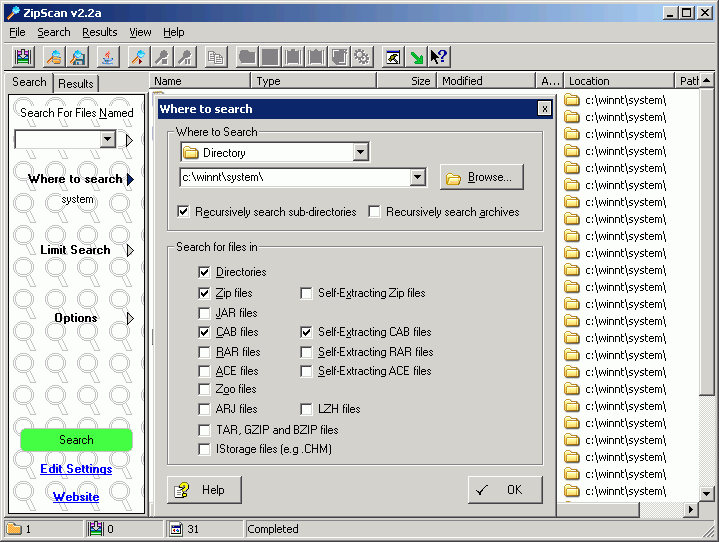
- Search for files inside directories, Zip, CAB, RAR, JAR (Java archive), ACE, TAR, GZIP, Z, BZIP, ZOO, LZH, ARJ, CHM, InstallShield CAB and OpenOffice files
- Search self-
extracting archives - Search and extract InstallShield CAB files
- Limit the search based on file size or modified date
- Search for files containing a given text string and show a short excerpt from the file
- Search the version resource tables of files
- Search nested archives (e.g. Zip files inside other Zip files)
- Scan single directories or drives, single archives or all hard drives
- Search your Classpath for Java classes
- Open and extract IStorage files such as .CHM help files
- Provides find-
in- files functionality for the OpenOffice suite - Supports both Microsoft and InstallShield format CAB files
- ZipScan has a context-
sensitive help system - Automatic installation and uninstallation
- Pause and resume search
- Search Wizard for easy specification of searches
- Files found can be extracted from archives, opened or viewed in Notepad
- Output a list of all files found as text, comma-
separated values or HTML - Save and load search parameters so you can easily re-
run searches - Integrated with Windows Explorer
- Copy files to the clipboard or drag-
drop them to an Explorer window - Support for password-
protected archives - Includes a command-
line interface - ZipScan can search the unlimited size 64-
bit zip files that can be created in Winzip 9.0.
Note: Extracting InstallShield CAB files requires an additional download. See the program for details.
Screenshot